Here we instruct how to use PHP to parse multiple selection form fields in your HTML or HTML5 forms. The resulting variable is an array if you instruct the select field to handle multiple options. We have to break this array down to split the selections for our data processing needs, or you can choose to save the serialized complete array into one MySQL database field.
SAN FRANCISCO (AP) — After laying off more than 300 workers,Twitter CEO Jack Dorsey is trying to lift the spirits of the remaining employees by giving them 6.8 million shares of the stock he owns in the online messaging service.
Dorsey is giving up the stock, currently worth more than $200 million, so Twitter can award the shares to its employees, according to documents filed Friday with the Securities and Exchange Commission.
The gesture comes a week after Dorsey laid off 8 percent of Twitter's workforce in an effort to make the company profitable for the first time in its nine-year history. The gift represents nearly one-third of the stock Dorsey owns in the San Francisco company.
We speak to one avid online gamer about how the medium is replacing traditional social media.
Harrison, 16, reveals how a new generation is turning to Xbox and PlayStation as a way to stay in touch with friends and meet new people.
Harrison says: Online multiplayer gaming is like Facebook, but there are far more things to do. It’s just a more entertaining way to be in touch with people.
It’s a great way to stay in touch with my friends and I’ve also made new friends in games who I’ve go on to meet away from the screen.
It’s no longer just entertainment. It’s a new kind of experience. Online gaming on PayStation 4 or Xbox One basically IS a social network. I can instantly see what my friends are up to, and choose whether or not to join in.
When we ‘meet up’, we don’t just shoot each other. There’s lots of ways to interact in online games, whether it’s just sending a message or actually making some sort of in game gesture. Even something stupid like dancing.
If I do something amazing in game, I can also share pictures and video direct to Twitter or Facebook which makes the whole experience even more ‘social’.
Although I will play almost any game, I play online games more than any others. It’s just more satisfying and enjoyable to play with a human being rather than a computer.
When it comes to playing against the computer it’s easy to get bored. If it’s a real person there, it keeps you interested.
Games without multiplayer aren’t over, though. There are just new ways to play. There are plenty of games where you are playing a single-player story, but there just happen to be other people around.
'Destiny' is a good example. You never have to shoot your mates if you don’t want to.
'Destiny' is online right from the very beginning, but you have the option of completing the game by yourself or with others. It’s a great way to stay connected with people. Personally, I really enjoy that way of playing.
I know some people might find it odd, but it’s totally normal for me to wear a headset while playing and talk to other gamers - both people I know and people I don’t.
If someone is sending you a text message, it’s usually because either they don’t know you or their headset has broken and they are waiting for a new one. I think most online players will be able to relate to this!
Microsoft just unveiled its first laptop — and it says it's twice as fast as a Macbook Pro
microsoft surface book
(Screenshot) Microsoft on Tuesday unveiled its first laptop: the Microsoft Surface Book, a 13-inch touch-screen device that also comes apart to become a tablet.
"This is the ultimate laptop," Microsoft's Panos Panay said.
It has two processors and a dedicated graphics-card system. Microsoft says the laptop is twice as fast as a Macbook Pro.
Pricing starts at $1,499, and the laptop will be available on October 26.
As with all devices in the Surface line, the Surface Book can detach from its keyboard to become a tablet. The keyboard can then dock on the back of the tablet to keep it all together. It also uses the Surface Pen stylus that comes with Surface tablets.
Microsoft Surface Book
(Microsoft) The Surface Book has a unique hinge.It's designed to add more power than the Surface Pro 4, also announced Tuesday. It's for gamers and any enterprise worker who needs more graphical horsepower under the hood. In fact, the Xbox team contributed its graphical expertise, Panay said.
Panay showed off how smoothly Windows 10 games like "Gears of War" and "Gigantic" ran on the Surface Book, even while using video-editing software to record game footage.
Interestingly, the graphics card lies in the keyboard unit, which means you will lose some horsepower while it's unplugged — at a likely gain to battery life.
Plus, it has a super-quiet, backlit keyboard, Microsoft promises, with a great typing experience. It also sports a promised 12-hour battery life.
microsoft surface book
(Screenshot)
The idea of a laptop that's also a tablet isn't exactly new: PC manufacturers like Lenovo have for some time been making similar "convertible" units that fold in on themselves to become a laptop.
But by making the keyboard detachable, and by giving it a ton of horsepower, it seems Microsoft has been really thinking through the design of this device.
Microsoft has announced through their Lumia Facebook page that the global rollout of Windows 10 Mobile will begin this December, bringing the company's completely revamped mobile operating system to older Windows Phones before the end of the year.
The statement from a Microsoft representative on Windows 10 Mobile upgrades is as follows:
Windows 10 is available on PCs and tablets now, and while Lumia 950 and Lumia 950 XL ship with Windows 10 for phones, broad availability of Windows 10 on other devices, including mobile phones, will begin rolling out in December.
You can update the
password via mysql. You can run the following query in mysql to update
password. The given hashed value is the hashed value of password: NewPassword
UPDATE users
SET pass = '$S$DRSUIz9NFfxOXKPveQ00UTGMzsJe62LjYvVHfYJ8I8wuy4zRqVBK' WHERE uid = 1;
Clear flood table
If you have reset
password either by using script or "request new password" but still
receive "Sorry, there have been more than 5 failed login attempts for this
account. It is temporarily blocked." then you may
delete the corresponding entry in flood table.
This flood table records username and ip which has failed login
attempts.
Reviewed: The Thinnest, Loveliest MacBook You’ll Never Buy
It’s so easy to blast Apple for sacrificing utility in the name of beautiful design. Everybody does it every time a new Apple product comes out.
The iPhone, 2007: “No keys! No memory card! No removable battery! Doomed!”
The MacBook Air, 2008: “No DVD drive! No hard drive! Doomed!”
The iPad, 2010: “No USB ports! No expansion! Doomed!”
But time passes. The tumult dies down, the product becomes a huge hit, and rival companies soon embrace exactly the same design.
This Friday, you’ll be able to buy the company’s latest product, the MacBook. Not the MacBook Air, not the MacBook Pro (both of which will remain for sale). Just MacBook.
Yes, the cycle of “Doomed!” is about to begin again. I know this cycle too well. I’ve lived through it over and over. And even so, this time, when I behold this new 12-inch MacBook, I want to shout: “This time, you’ve really gone too far!”
I mean, no jacks at all!?
That’s correct. No standard USB jacks, no video output jacks, no memory card slot, no Thunderbolt port, no Ethernet.
On top of all that, Apple has the gall to introduce another MacBook power connector. With this model, Apple has abandoned the MagSafe connector (both versions of it), the magnetic charging plug that doesn’t drag your laptop to the floor when someone trips on it.
When Apple unveiled MagSafe, Steve Jobs hailed it as a triumph of clever engineering and common sense. And now suddenly MagSafe is dropped like chopped liver.
Meet the MacBook
OK, well, that’s the bad news.
The good news is that this laptop looks amazing. It is crazy thin, light, and small. It’s available in three aluminum hues (a first for Apple) — standard silver, gold, and gray. The gray looks wicked great.
LONDON
(Reuters) - U.S. scientists said they have invented a cheap,
long-lasting and flexible battery made of aluminum for use in
smartphones that can be charged in as little as one minute.
The researchers, who detailed their discovery in the
journal Nature, said the new aluminum-ion battery has the potential to
replace lithium-ion batteries, used in millions of laptops and mobile
phones.
Besides recharging much faster, the new aluminum battery
is safer than existing lithium-ion batteries, which occasionally burst
into flames, they added.
Researchers have long tried but failed to develop a
battery made of aluminum, a lightweight and relatively inexpensive metal
that has high charging capacity.
A team lead by chemistry professor Hongjie Dai at Stanford
University in California made a breakthrough by accidentally
discovering that graphite made a good partner to aluminum, Stanford said
in a statement.
In a prototype, aluminum was used to make the
negatively-charged anode while graphite provided material for the
positively charged cathode.
A prototype aluminum battery recharged in one minute, the scientists said.
"Lithium-ion batteries can be a fire hazard," said Dai.
"Our new battery won't catch fire, even if you drill through it."
The new battery is also very durable and flexible, the scientists said.
While lithium-ion batteries last about 1,000 cycles, the
new aluminum battery was able to continue after more than 7,500 cycles
without loss of capacity. It also can be bent or folded.
Larger aluminum batteries could also be used to store renewable energy on the electrical grid, Dai said.
(Reporting by Eric Onstad, editing by David Evans)
If you’re an iPhone or iPad
user, odds are that you use mobile Safari to do all of your web
browsing. But buried underneath all all of the more overt browsing
options is a hidden way to search an individual webpage for a specific
word or phrase.
Here’s how you can find it and use it to your heart’s content.
Let’s
say I hop on over to NBA.com and want to quickly scan the page for any
stories involving, say, Kevin Durant. Instead of tediously scrolling
through the entire webpage and hoping to spot a story of interest, iOS
provides a clever way to do all of the heavy lifting for you.
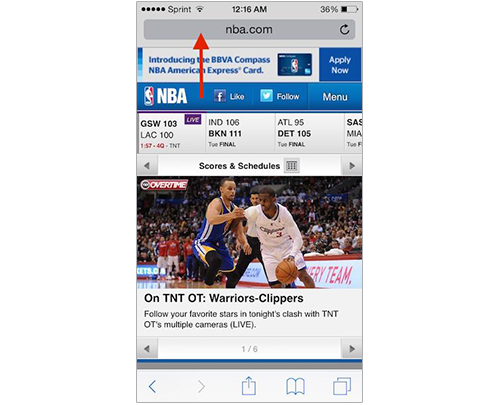
To get started, simply apply a single tap to the URL bar, highlighted below.
Once the URL bar becomes highlighted, you can begin typing in your search phrase which, in this case, is “Durant.”
Next, you’re presented with what appears to be a standard Safari search results page. Clearly these are of no help.
But here’s where things get cool.
Simply
scroll further down on the page and you’re soon presented with a
previously hidden category which lists out all of the instances in which
“Durant” is found on the webpage in question.
Boom. There it is.
Following
that, simply tap on “durant” and you’re whisked back to the NBA.com
homepage and all of the instances of “Durant” on the open page will be
highlighted in yellow. What’s more, iOS makes it easy to navigate
between each instance of the word simply by tapping the arrow keys on
the lower left hand side of the display.
For
a feature that’s as useful and widely used as in-page search, one would
think that Apple would advertise this functionality just a little bit
more. Either way, this handy tip should help save some time you might
otherwise spend searching and slogging through a massive webpage with
tiny text.
Wireless networks have come a long way in the past 15 years.
And yet, sustained WiFi speeds are still a vexing problem in a lot of
situations. A number of things can come into play, such as the way your
router is set up, whether there’s nearby interference, if you live in an
apartment building or a separate house, and how far apart your devices
are from the router. Fortunately, there’s always a way to fix
slow transfer speeds.
If you’ve ever messed around with your WiFi router’s settings, you’ve probably seen the word channel.
Most routers have the channel set to Auto, but I’m sure many of us have
looked through that list of a dozen or so channels and wondered what
they are, and more importantly, which of the channels are faster than the others. Well,
it turns out some channels are indeed much faster — but that doesn’t
mean you should go ahead and change them just yet. Read on to find out
more about 802.11 channels, interference, and the massive difference
between 2.4GHz and 5GHz WiFi.
Channels 1, 6, and 11
First
of all, let’s talk about 2.4GHz, because as of the start of 2015, almost
all WiFi installations still use the 2.4GHz band. 802.11ac,
which debuted in 2013, is driving adoption of 5GHz — but thanks to
backwards compatibility and dual-radio routers and devices, 2.4GHz will
continue to reign for a while.
All
of the versions of WiFi up to and including 802.11n (a, b, g, n)
operate between the frequencies of 2400 and 2500MHz. These paltry 100MHz
are separated into 14 channels of 20MHz each. As you’ve probably worked
out, 14 lots of 20MHz is a lot more than 100MHz — and as a result,
every 2.4GHz channel overlaps with at least two (but usually four) other
channels (see diagram above). As you can probably imagine, using
overlapping channels is bad — in fact, it’s the primary reason for awful
throughput on your wireless network.
Fortunately, channels 1, 6,
and 11 are spaced far enough apart that they don’t overlap. On a
non-MIMO setup (i.e. 802.11 a, b, or g) you should always try to use
channel 1, 6, or 11. If you use 802.11n with 20MHz channels, stick to
channels 1, 6, and 11 — if you want to use 40MHz channels, be aware that
the airwaves might be very congested, unless you live in a detached
house in the middle of nowhere.
What channel should you use in a built-up area?
If you
want maximum throughput and minimal interference, channels 1, 6, and 11
are your best choice — but depending on other wireless networks in your
vicinity, one of those channels might be a much better choice than the
others.
For example, if you’re using channel 1, but someone next
door is annoyingly using channel 2, then your throughput will plummet.
In that situation, you would have to change to channel 11 to completely
avoid the interference (though 6 would be pretty good as well). It might
be tempting to use a channel other than 1, 6, or 11 — but remember that
you will then be the cause of interference (and everyone on 1, 6, and 11 will stomp on your throughput, anyway).
In
an ideal world, you would talk to your neighbors and get every router
to use channels 1, 6, or 11. Bear in mind that interior walls do a
pretty good job of attenuating (weakening) a signal. If there’s a brick
wall between you and a neighbor, you could probably both use channel 1
without interfering with each other. But if it’s a thin wall (or there’s
lots of windows), you should use different channels.
There are tools that can help you find the clearest channel, such as Vistumbler,
but it’s probably easier to just switch between channels 1, 6, and 11
until you find one that works well. (If you have two laptops, you can
copy a file between them to test the throughput of each channel.)
But what about 5GHz?
Get ready for lots of antennas.
The great thing about 5GHz (802.11n and 802.11ac), because there’s much more free space at the higher frequencies, is that it offers 23 non-overlapping 20MHz channels!
It’s also worth pointing out that, starting with 802.11n, wireless technology in general is a lot
more advanced than the olden days of 802.11b and g. If you own a modern
802.11n router (i.e. if you bought a router in the last couple of
years), it likely has some fancy hardware inside that chooses the right
channel and modifies the output power to maximize throughput and
minimize interference.
If you’re using the 5GHz band, and your
walls aren’t paper-thin, then attenuation and the general lack of 5GHz
devices should mean there’s very little interference in your apartment —
possibly even allowing you to use the fatter 40, 80, and 160MHz
channels if you feel like it.
Eventually, as everyone upgrades to
newer hardware and moves towards 5GHz, picking the right channel will
mostly become a thing of the past. There may still be some cases where
it makes sense to fine-tune your router’s channel selection. But when
you’re dealing with MIMO setups (up to eight in 802.11ac), it’s
generally a better idea to let your router do its own thing. Eventually,
of course, 5GHz will fill up as well — but hopefully by then, we’ll
have worked out how to use even higher frequencies (60GHz WiGig) or entirely new antenna designs (pCells, infinite capacity vortex beams) to cope with our wireless networking demands. Sebastian Anthony contributed to this report.